
Turn Obsidian Notes into Anki Flashcards with Anki Heading Sync
Learn how Anki Heading Sync turns Obsidian H4 headings into Anki Q&A cards, organizes answers as lists, splits lists into subcards, and links back to the source note.
Q&A cards are the format I recommend most and the one I use most often. Since this is the first article in the series, I’ll start here.
I’ll use my Obsidian plugin, Anki Heading Sync, to show how a Markdown note can become several Q&A cards in Anki.
You can search for and install the plugin from Obsidian’s Community Plugins browser. The Obsidian plugin page covers installation requirements and setup; the GitHub repository has the source code and releases.
Start with an H4 heading
In my Obsidian notes, each H4 heading is a question, and the body beneath it is the answer. Anki Heading Sync uses this structure to sync Markdown content to Anki. The simplest format looks like this:
#### Question
Answer
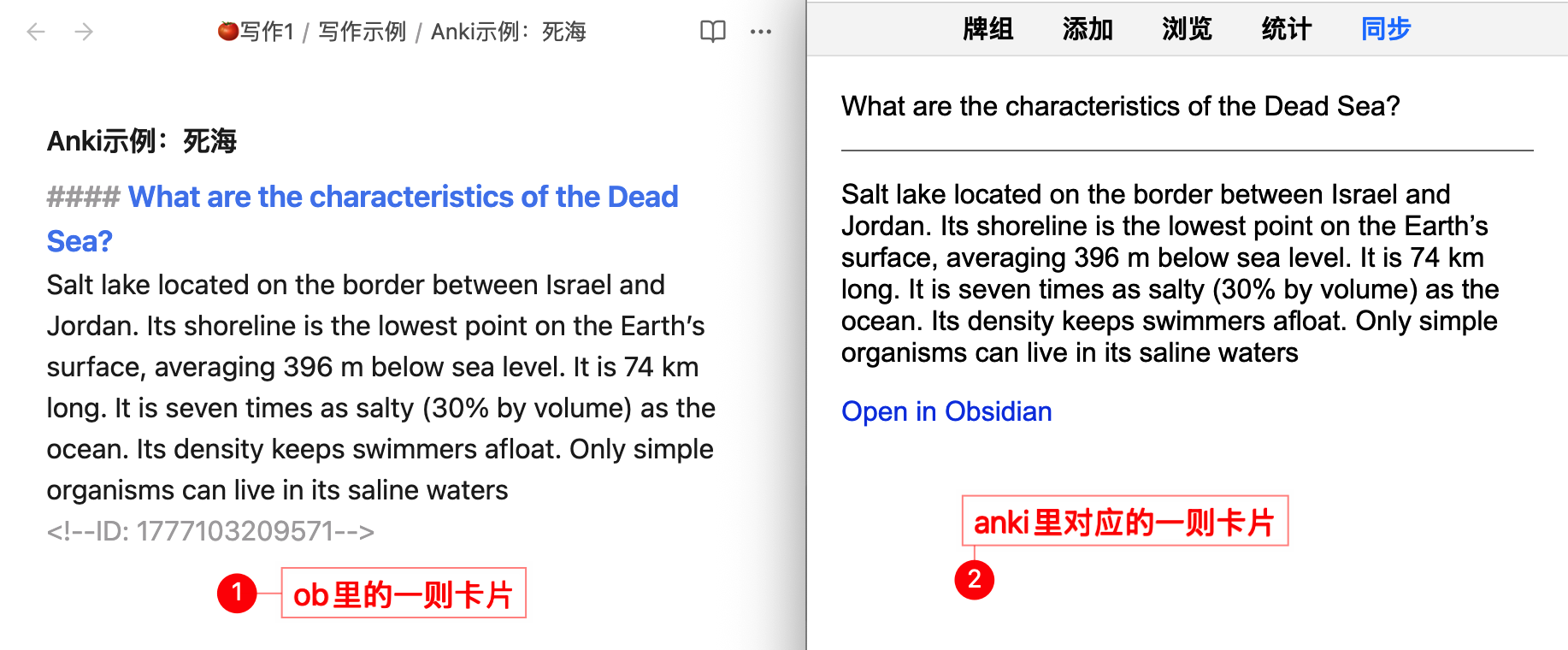
This is straightforward to write, and the result in Anki is easy to scan:
How much information should go on one card?
Strictly speaking, there is no fixed answer. What each person has learned so far affects how much information they need to recall. In other words, even when we are learning the same concept or answering the same question, the amount of information we need varies from person to person.
For example, SuperMemo’s article “Effective learning: Twenty rules of formulating knowledge” includes an example about the Dead Sea. I’ll use it too to compare different ways of organizing cards with different amounts of information.
For someone familiar with the Dead Sea, a card might look like this:
Q: What are the characteristics of the Dead Sea?
A: Salt lake located on the border between Israel and Jordan.
Its shoreline is the lowest point on the Earth’s surface, averaging 396 m below sea level.
It is 74 km long.
It is seven times as salty (30% by volume) as the ocean.
Its density keeps swimmers afloat.
Only simple organisms can live in its saline waters
Here is the same example formatted in my Obsidian and Anki workflow:
This is the example used in the SuperMemo article. There, Q and A label the question and answer. I use H4 headings directly for questions, so the screenshot above shows how I formatted the same example in Obsidian.
Looking at the card itself, notice how much information the answer contains. It can prompt you to recall the Dead Sea’s location, elevation, and salinity at once. If you are not familiar with these facts, you have to recall several things at the same time. You may remember only some of them and forget the rest.
Organize an answer as a hierarchical list
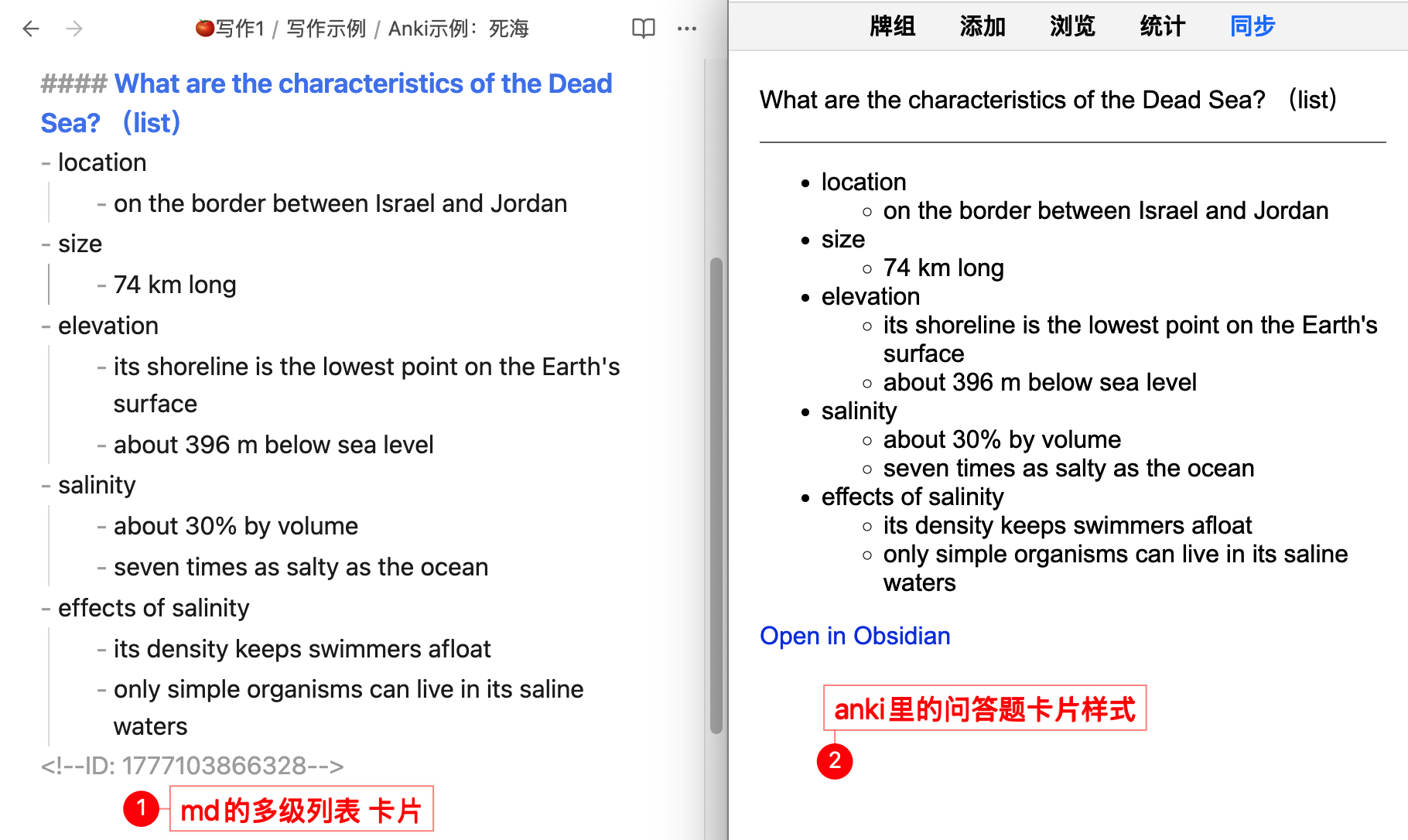
When I organize knowledge cards, I sometimes put the answer into a hierarchical list. That lets me remember a few categories first, then the details under each one.
For a concrete topic like the Dead Sea, I might group facts into familiar categories such as location, size, and characteristics. Here is an example of that kind of grouped note:
Q: What are the characteristics of the Dead Sea?
A:
- location
  - on the border between Israel and Jordan
- size
  - 74 km long
- elevation
  - its shoreline is the lowest point on the Earth's surface
  - about 396 m below sea level
- salinity
  - about 30% by volume
  - seven times as salty as the ocean
- effects of salinity
  - its density keeps swimmers afloat
  - only simple organisms can live in its saline waters
In Obsidian, the list groups facts about the same topic. After syncing to Anki, they remain on a single grouped card. It is still a basic Q&A card; the difference is simply whether the answer is written as prose or organized as a list.
Use #anki-list to split a list into smaller cards
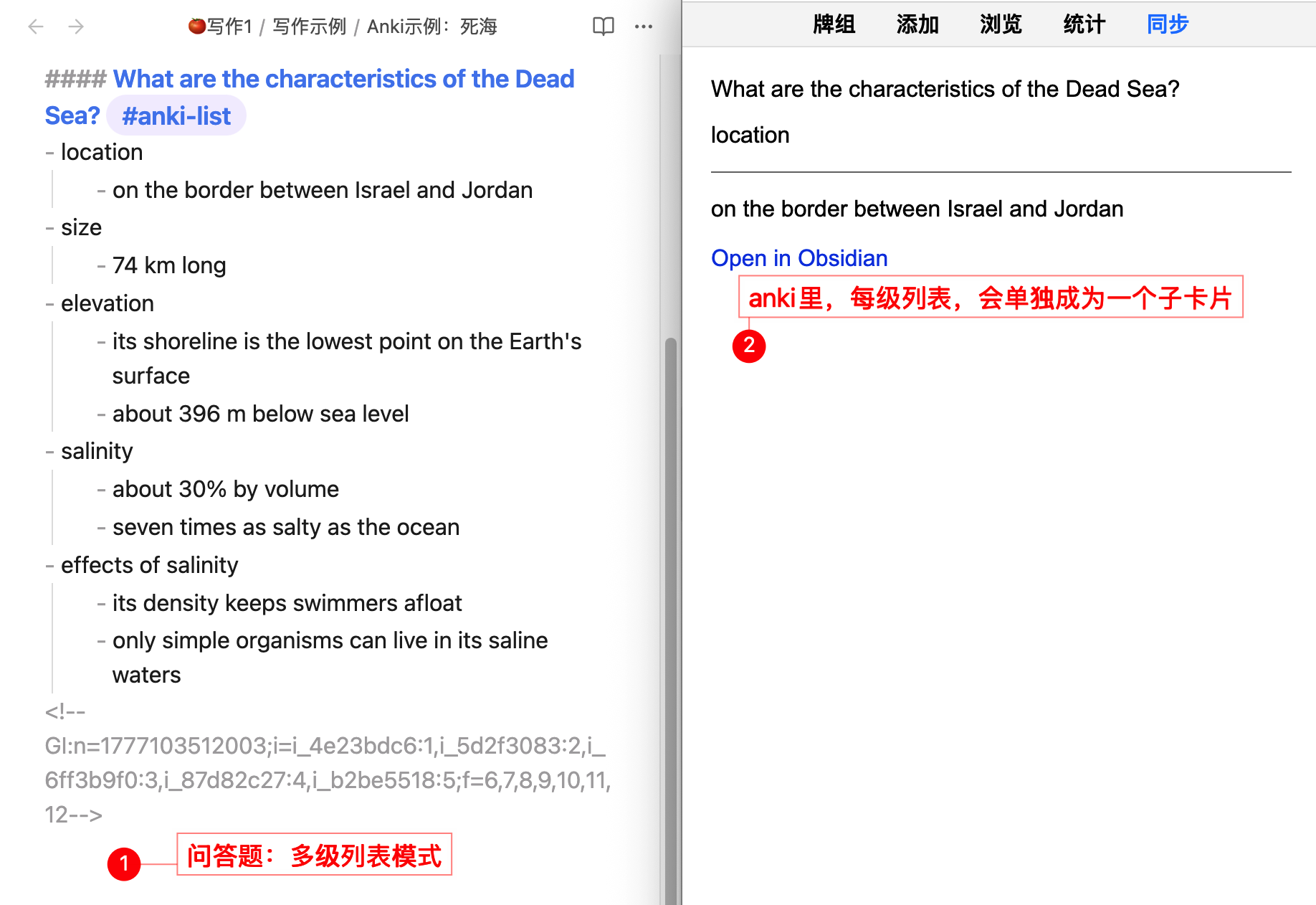
While using the plugin, I added another variation: splitting a multi-level card into several smaller subcards.
If I want to recall each item in a list separately, I can add #anki-list after the H4 heading. The plugin then splits the nested list into smaller Q&A subcards.
This lets me reorganize knowledge with lists in Markdown, then review one specific point at a time in Anki. It is also my favorite feature of the plugin.
Beginners can start with smaller Q&A cards
For beginners, I recommend expressing each piece of knowledge as one simple question and one answer. Here is another example from SuperMemo:
(These days, AI can break knowledge down into smaller Q&A cards very quickly. I don’t have to do it all by hand anymore—thank goodness.)
Q: Where is the Dead Sea located?
A: on the border between Israel and Jordan

Q: What is the lowest point on the Earth’s surface?
A: The Dead Sea shoreline

Q: What is the average level on which the Dead Sea is located?
A: 400 meters (below sea level)

Q: How long is the Dead Sea?
A: 70 km

Q: How much saltier is the Dead Sea than the oceans?
A: 7 times

Q: What is the volume content of salt in the Dead Sea?
A: 30%

Q: Why can the Dead Sea keep swimmers afloat?
A: due to high salt content

Q: Why is the Dead Sea called Dead?
A: because only simple organisms can live in it

Q: Why only simple organisms can live in the Dead Sea?
A: because of high salt content
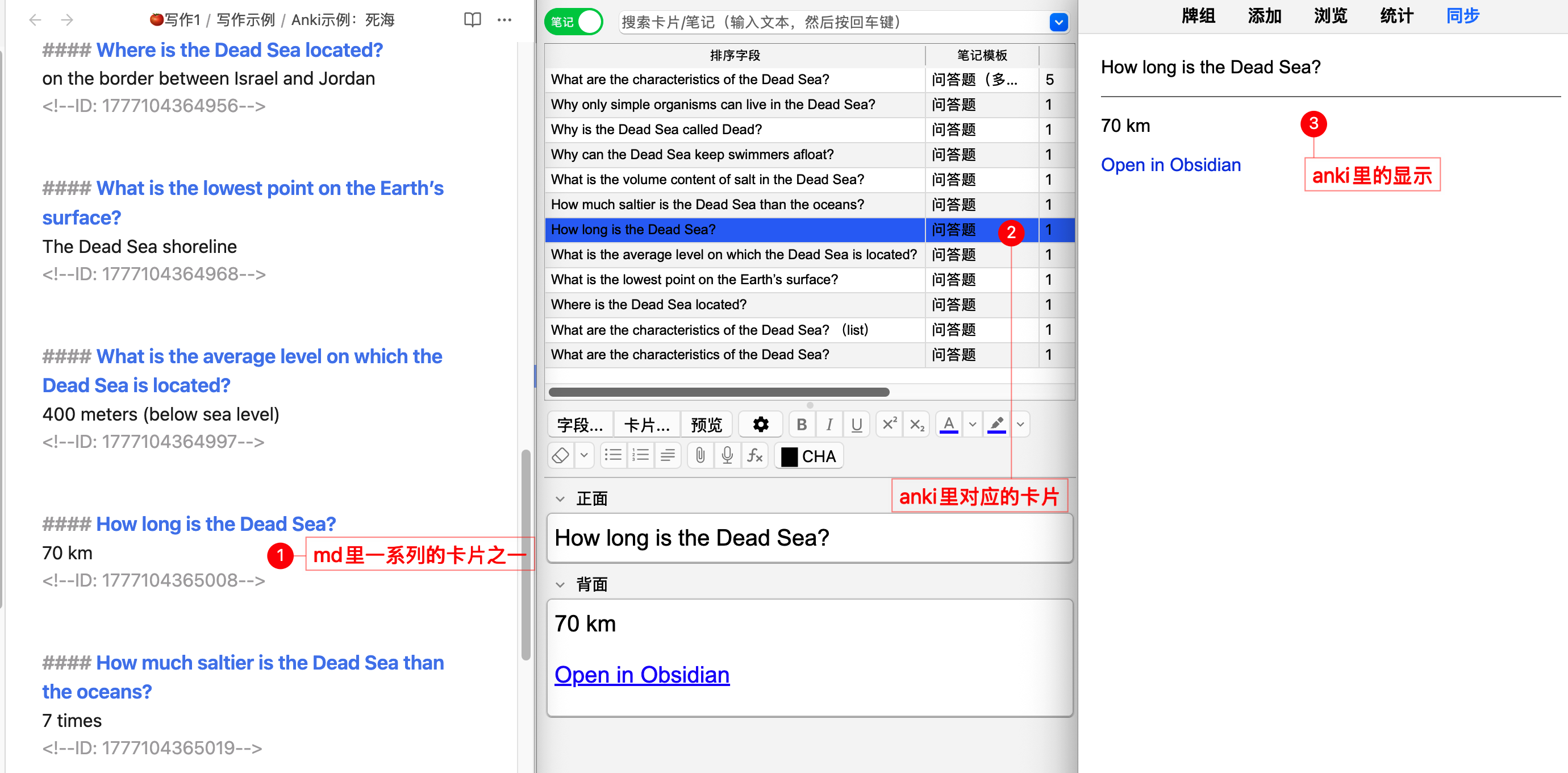
Here is what the same topic looks like in my Obsidian and Anki workflow:
Return to Obsidian from Anki and keep editing
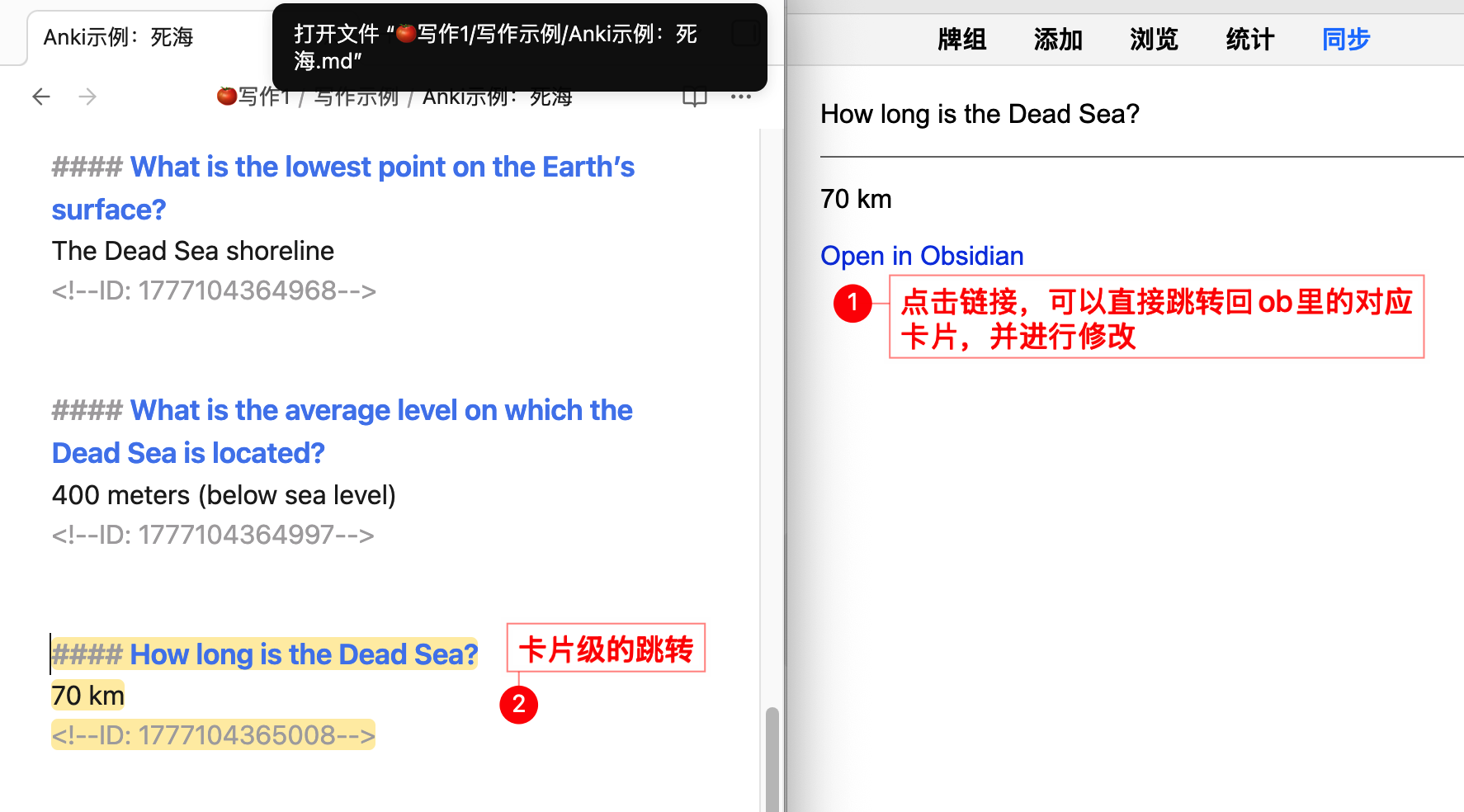
At this point, a card in a Markdown note has made its way into Anki. After syncing, I can click the Obsidian link on an Anki card to jump straight back to the corresponding part of the note, make a change, and sync it again. Repeating this cycle lets knowledge gradually take shape in my mind.
Obsidian, Anki Heading Sync, and Anki each have a role
When I read, I choose how to capture a topic based on how familiar I am with it: one detailed note in Obsidian, a list-based note, or several smaller Q&A notes. Anki Heading Sync syncs those cards from Obsidian to Anki in batches. Anki handles spaced repetition. That is my overall workflow, from organizing knowledge to reviewing it with cards.
Read the Chinese version.